
Team photos are visual mementos that help players to commemorate their escape room experiences and share them with friends. For many escape room companies, team photos are also a major missed opportunity.
Team photos can be powerful marketing tools, yet all too many companies still take their photos against a blank wall with a crusty old iPad and kitschy cardboard signs, resulting in generic, blurry, or boring photos that likely do not represent the quality of the experience. Even when the image is interesting, many photos still turn out poorly due to bad lighting, bad composition, or bad cameras.
This negatively affects not only individual companies but the escape room industry as a whole. Team photos are not just a bonus add-on; they’re a key part of the overall escape room experience that should be thoughtfully designed, just like set, puzzles, and story.

Whether you’re a creator or a player, here are a number of tips and tricks to help you level up your escape room team photo game.
Where to Take Team Photos
Escape Room Sets
Team photos taken on escape room sets tend to be far more memorable and visually appealing than those taken in lobbies or hallways.
Yet in an effort to avoid spoilers, many escape rooms prevent players from taking any photos in the game space, including team photos. I’d like to push back on this mindset. Even if you want to keep the overall environment a surprise, there’s almost always an area of the room that will intrigue rather than spoil potential players.
Furthermore, you can design the set around having a designated spoiler-free photo area that’s representative of the overall quality of set design. In other words, consider what you want team photos to look like while you create the set, not as an afterthought.
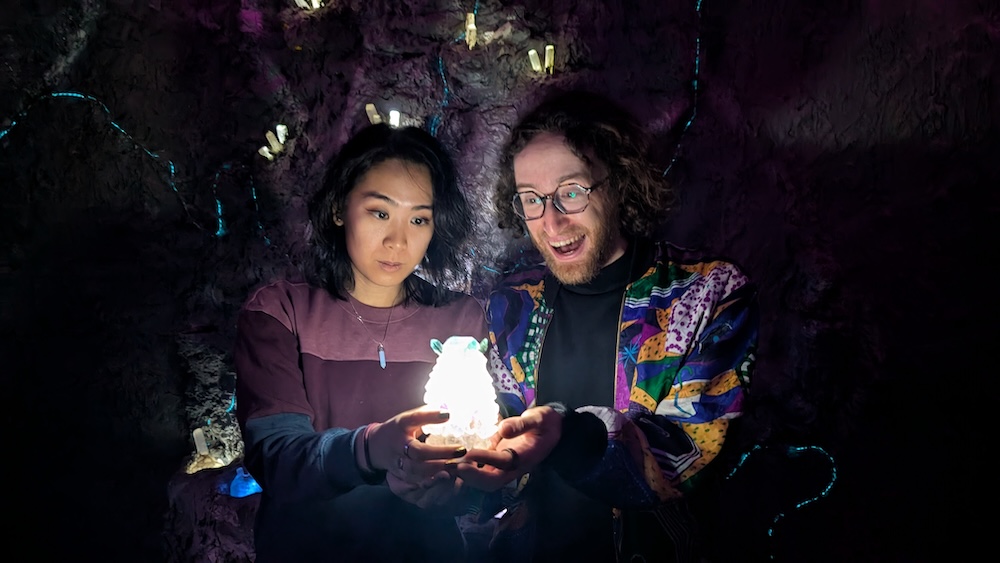
This principle applies more generally: when an escape room company uses clip art or stock photos on their website, it looks unprofessional and may lead players to think that company has something to hide. Look at REA reviews for examples of how to take spoiler-free photos, focusing on early-game spaces and close-up details of thematic props.
Photobooths & Backdrops
Even if you choose not to take team photos inside the room, there are still many ways to get creative with the background.
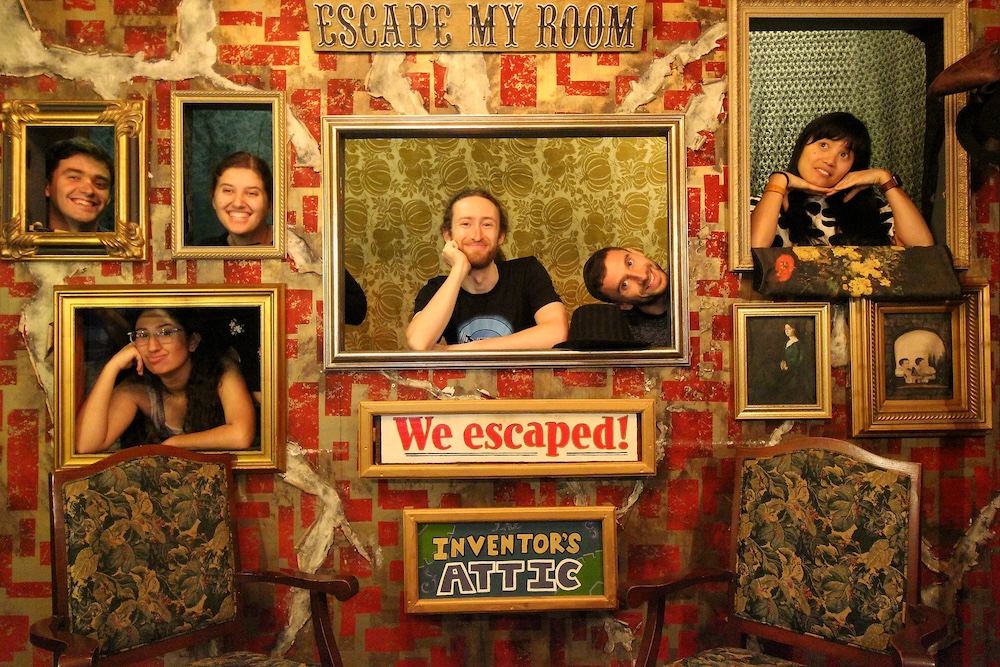
Escape My Room in New Orleans positions players in framed windows within a distinctive backdrop. This design embodies their eclectic branding, and a stationary camera ensures a perfectly positioned photo every time.
Terror Isle in Texas City (now closed as an escape room, but still open as a haunt) built a pirate ship facade in their lobby. This elaborate 3D photobooth utilizes a similar style and build quality to their escape room sets, just with better lighting for photos and no concerns about puzzle spoilers.
We’ve encountered countless escape rooms that take their team photos in front of a sign with the company name in the lobby or hallway. While this provides clear branding, it often ends up looking static and forgettable, and it’s often not well designed or positioned for photos. There are exceptions, of course, like Don’t Take A Breath in Athens, which features a bright pink sign of their logo that’s instantly iconic. You can also integrate a sign with the game’s title into the set itself.

What to Include in the Photo
Signs
“I escaped!” “Teamwork makes the dream work!” “I’m with stupid.”
A basket of silly and punny signs was a core part of the classic escape room experience. At this point, there’s something almost nostalgic about this tradition, but I think we can do better. Let’s be honest: most of these signs look pretty cheap, and they’re often in terrible condition. Laminated signs in particular are flimsy and prone to glare.
Upgrade your sign game with a nicer material like engraved wood. Stick to a single sign that features the game’s title, and make sure the font is large enough to be readable in a photo. Including the team name and time can add nice personalization, though make sure that the dry erase marker isn’t dried out and that the GM’s handwriting is decently legible.
Physical Props
Escape rooms often offer a range of thematic props for photos, but not all props are equal.
Larger items usually read better in photos, and including too many props can make a photo look cluttered. Choose props that can prompt a dynamic action, and which give players something to do with their hands (because posing is hard!)
If you offer players an open selection of props from throughout the game, it can be helpful to suggest which items will look good in photos and aren’t puzzle spoilers. Alternatively, we’ve seen some companies create duplicates of props from the game specifically for photos. This can be a good way to avoid spoilers, ensure photo props stay in good condition, and even create oversized versions that work better for photos.
Props can also be combined with lighting for fun effects.

Costumes
Players wearing street clothes likely don’t match the immersive environment around them, but costumes can help to bridge this gap.

Whether you provide costumes for the entire experience or just for the photo, offer an inclusive range of sizes and remember to clean costume pieces regularly, especially making sure to disinfect hats and masks. Not every player will feel comfortable with the cleanliness around the sharing of costumes regardless, so don’t overly push costumes on the players.
I personally love wearing costumes in escape rooms. If there’s a mysterious cloak or colorful jacket, I’m going to put it on immediately. That said, escape rooms can get quite hot when wearing extra layers. If players take off their costumes mid-game, it’s ok to gently remind them that they can put the costumes back on for a team photo.

Digital Frames and Stickers
Some escape rooms further enhance their team photos by overlaying digital elements.
A digital frame can turn a team photo into an alluring movie poster, sometimes also including info like company name, game title, team name, completion time, and even credits. Whether the frame is an elegant border or a more maximalist piece of digital art that integrates the photo, make sure that the photo stays the primary focus. Services like Buzzshot offer escape-room specific software that can automatically add special effects to post-game team photos, including digital frames or stickers.
The Tale of the Heartless Pirate at Dream Labs and Ghosthunter Brandon Darkmoor at The Room, both in Germany, offer particularly polished examples. The final image feels like a cohesive unit, with lighting and coloration of the photo that matches the vibe of the frame.

Less Branding
This might seem counterintuitive, but team photos are generally better marketing when they aren’t overbranded. Players don’t want to share something that looks like an ad. They’re more likely to share photos (and wear merch) that looks cool, and other people will organically want to learn more.
How to Take a Great Photo
If a photo is blurry, grainy, poorly cropped, or poorly lit, players are less likely to like and share it. Without getting into a full-on photography course, here are a few fundamentals to keep in mind when taking a great photo.
Camera
It goes without saying that a nicer camera takes nicer photos, and an ancient iPad isn’t going to cut it. That’s not to say you need to invest in a multi-thousand dollar DSLR. New flagship smartphones can take professional-quality photos without the need for tweaking any manual settings. Make sure to regularly update your phone’s software.
Composition
Photographic composition refers to the arrangement of elements in a photo such that it is balanced and aesthetically pleasing.

An immersive environment designed to look and feel a certain way while you’re in the middle of it isn’t necessarily also optimized to look good in a 2D photo, so here are a few things to keep in mind:
- Is there enough room to comfortably fit teams of all sizes? Will the photo look too crowded with 8 players? Too empty with 2 players?
- If players are standing around an interesting set piece, make sure they’re framing it, not blocking it. Also ensure that any props they’re holding aren’t unintentionally blocking their faces.
- How can players physically engage with the space around them? Are there easy poses that you can recommend?
- Make sure the photo doesn’t consist of too much blank floor or ceiling, and that it isn’t crooked.
- Follow the rule of thirds.
Lighting
The lighting utilized during the experience, especially for rooms with dark or colorful atmospheric lighting, isn’t always well suited for photos.
Possible solutions include:
- Pick a designated spot that already has good photo lighting.
- Purchase portable photographic lighting that can be brought into the room for photos.
- If you have control over the room’s lighting, create a separate lighting setting that’s specifically calibrated for photos.
Editing
The raw photo doesn’t need to be the final product. Whether you’re working with suboptimal lighting or just want a specific aesthetic, play with saturation, brightness, and contrast, or with various filters, to make a more polished image. Once you’ve found the right balance, make a preset to save time in the future.
Different photographic styles can also suit different eras and themes. Is your escape room set in the 1940s? Slap on a nice sepia filter. Set in the 1970s? Make it look like a Polaroid.
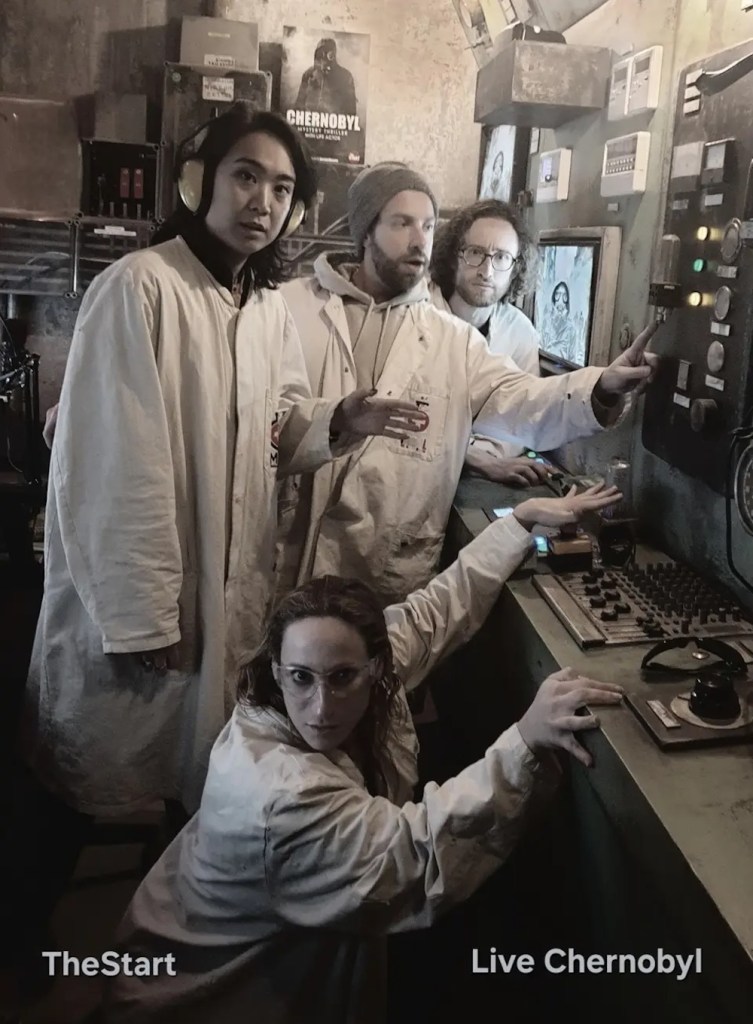
The Photographer
Game hosts are typically expected to take team photos. I’ve lost count of the number of times I’ve politely asked a gamemaster to retake our photo after seeing it’s crooked, uncentered, blurry, or awkwardly cropped. Being a great photographer isn’t a requirement of the job, but these basics are all easily teachable skills.
Create a few reference photos that demonstrate how to frame the background, where the photographer and players each should stand, and how to creatively pose players. Ensure consistent quality by having a nice camera available in case gamemasters or players only have older phones that would take lower-quality photos.
If you’re taking photos on a player’s phone, they’ll appreciate having 3-5 decent options to choose from rather than 30 nearly identical photos clogging up their reel.
Also, read the room. Some teams are dying to take a team photo. Do it immediately! You can explain whatever you were explaining later. Some teams clearly aren’t interested. You can skip this part of your script if they obviously want to leave in a hurry.
Who Is In the Photo
The answer to this question may seem obvious: the players. However, there are also some other special cases.
Actors
If there were performers in the game and their presence isn’t a spoiler, consider including them in the photo. Actors likely are pros at posing for photos, and they can also help players to strike more dynamic poses.

Even when a character isn’t physically present in the room, you could include them in the photo in some other form. Ghost Patrol elegantly demonstrates this idea, using a digital sticker to include the titular ghost alongside each team.
Solo Moments
Beyond team photos, escape rooms can also offer individual photo ops.
13th Basement at Exit Game in Anaheim, CA allows players to freely take photos throughout the game. One particular torture device lends itself to particularly photogenic solo photos that I’ve seen dozens of players share over the years. Free publicity!
During a recent visit to The Alchemist at Sherlocked in Amsterdam, after taking our team photos, my teammates and I each proceeded to take solo photos in front of the iconic central altar. They turned out amazing, and my favorite photo instantly became my new profile picture on multiple social media platforms.


Extra Credit: When and Why to Take Team Photos
In-Frame Photo Ops
Most team photos are taken after the escape room. The game ends, the magic circle closes, and the gamemaster either enters the room or guides the players back in to take a photo.
But does it always have to be this way? Depending on the specific context, can we take the team photo while players are still in the game world — and perhaps also justify the reason for why we’re taking a photo altogether?
Within certain narratives, it’s not hard to justify an in-game photo op. A fantasy character takes a selfie with you, excited to prove that they met humans. You take an expedition photo before heading off on a dangerous mission. You visually document a discovery to send to your past selves before stepping back in a time machine.
On-Ride Camera
At amusement parks, it’s standard practice to position a camera at a specific point alongside a roller coaster or haunted house in order to capture guests’ expressions at just the right moment.
Why not also try this in an escape room? Hide a camera right by your most interesting jump scare, or capture players’ faces as they enter a wondrous new space. But unlike amusement parks, don’t sell it to them. Also, make sure to delete these photos regularly. People don’t love other people having candids of them.
Phones Allowed
Certain escape room companies, like The Escape Game, have fully embraced the value of user-generated content and allowed players to have their phones out to take photos and video throughout the entire game.
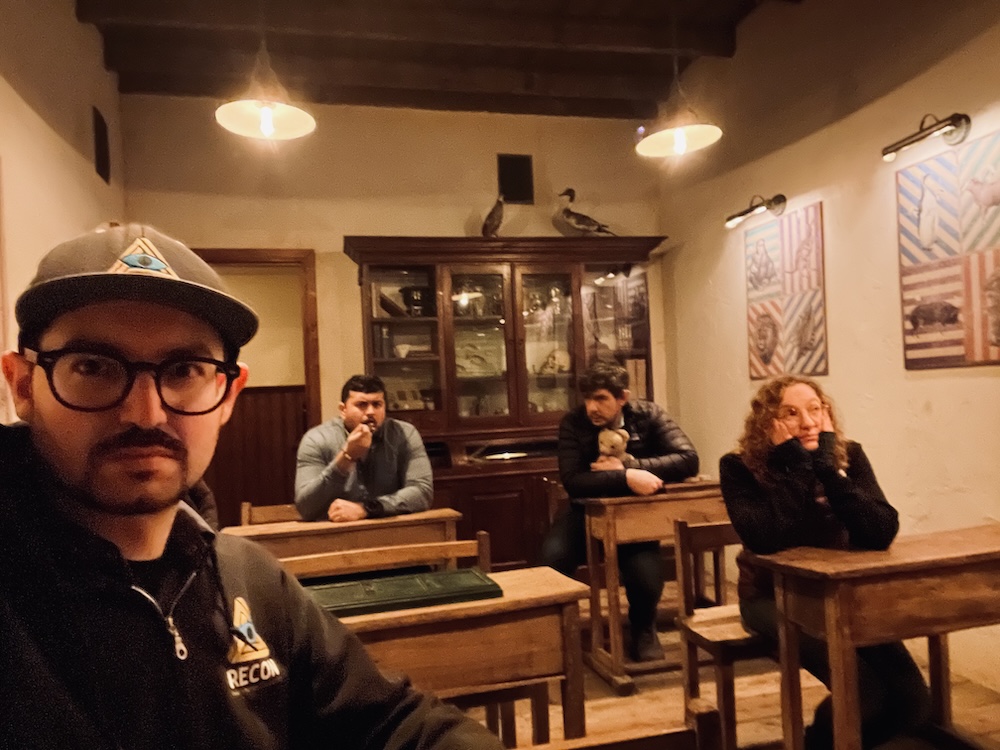
This is a double-edged sword. On one hand, this puts players fully in control over their social content, producing significantly more shareable candids in whatever formats the players prefer. It makes escape rooms feel more casual and approachable. On the other hand, freely allowing phones can take players out of the immersion if they’re focusing too much on documentation or getting distracted by outside communications.
V is for Video
An often neglected bit of escape room documentation are the live video feeds that game hosts use to monitor players throughout the game. At a tiny handful of escape room companies, including Mama Bazooka in the Netherlands and TheStart in Belgium, players are shown video highlights from their experience after their game ends. This is a creative way to let players relive the coolest moments from a different perspective, and in the case of TheStart, it showcases amazing actor performances that players may not have fully appreciated while in the chase.
To note, neither company allows players to record or share these videos.
The Mystery of the Deveaux Family at Panik Room in Paris takes this a step further. The experience is centered around a unique premise: one player at a time goes into a haunted mansion with a blindfold and a livestream camera, while their teammates guide them around from a separate control room. Panik Room offers a download of the full, edited recording for an additional charge, allowing teams to own a feature-length horror film starring themselves.
One final example comes from a challenge arcade: Beat the Bomb. In their classic paint bomb mission, teams attempt to defuse a colorful paint bomb. Whether or not they’re successful, almost all teams choose to let the bomb go off, leading to a dance party and a highly shareable collection of photos and video.

Short-form video is currently dominating the internet, with many platforms trying to copy TikTok’s success. If you give players compelling video clips to share, you’re setting yourself up for marketing success.
Share Your Team Photos!
For most escape rooms, even many globally top-ranked escape rooms, team photos are an afterthought. Companies build an awe-inspiring escape room set, and then we get a generic photo in front of a random door.
It doesn’t have to be this way. Hopefully by this point, you’ve realized both that a lot of thought can go into this part of the escape room experience, and that a little effort goes a long way. Team photos are not and should not be the focus of the experience, but for people who weren’t there, this is likely the only part they’re going to see, and for people who were there, this is all they have to remember their experience by.
If you’re running an escape room, make sure it’s easy for players to share their photos. If you take the photo on one player’s device, will they remember or be able to share it with all their teammates? If you take the photo on the company’s device or the gamemaster’s device, you have a bit more control.
By using a system like Buzzshot, each player who fills out a waiver will receive an email with their team photos. It’s nice to have a standard, easy way for everyone to cares to immediately get their photo.
Eliviascape in Quebec City even built their own photo-sharing system, where players can scan wall art in the lobby and select the game they played to immediately receive the team photo after playing the game.

And lastly, if you’re a player, whenever you enjoy an escape room and get a cool photo, share it! This helps individual escape room companies and the escape room industry as a whole.

![Brain Games – Flynn’s Arcade [Review]](https://roomescapeartist.com/wp-content/uploads/2026/01/brain-games-flynns-arcade-1.jpg)

![Mothman Themed House AirBnB Escape Room [Review]](https://roomescapeartist.com/wp-content/uploads/2026/02/airbnb-mothman-house-2.jpg)
![The Escape Game – Legend of the Yeti [Review]](https://roomescapeartist.com/wp-content/uploads/2026/01/legend-of-the-yeti-legend-of-the-yeti-3.jpg)
Leave a Reply